
THE CONTENT EDIT · 8 OCTOBER 2026
Free 30-Day Social Media Content Calendar for Small Businesses
Plan twelve purposeful posts over thirty days. Download a free editable CSV template for your service business and turn customer questions into useful content.
By Bharat Link-Up Editorial · Published October 8, 2026 · Updated October 14, 2026
30-day planning cycle · 12 publishing prompts · Excel / Google Sheets · No email required

A social media content calendar for a small service business should record the customer question, publishing date, format, owner, approval status and next step for every post. Start with three posts per week: one helpful explanation, one piece of credible evidence or process, and one invitation to take the next step. This is a manageable starting plan, not a platform rule or a promise of reach.
Use the 30-day schedule below for a studio, consultant, local service provider or small agency. It contains 12 publishing prompts, with the remaining days available for preparation, customer replies and review. You do not have to publish every day to use a monthly calendar.
Get the free content calendar template ↓ · No email required · CSV for Excel or Google Sheets
1. Choose one business goal before choosing post ideas
Write down what a useful month would accomplish: more qualified inquiries, fewer repeated questions before appointments, or more visits to a specific service page. Pick one primary outcome. A post intended to explain a process needs a different next step from a post inviting a consultation.
Collect five questions from real conversations, support messages or sales calls. Remove private details. If customers repeatedly ask what a service includes, answer that question before writing a broad inspirational post.
Choose a primary channel based on where your customers already engage with you. A business selling to professionals might test LinkedIn; a visually demonstrable service might test Instagram. These are planning choices, not claims that either platform guarantees customers.
2. Free social media content calendar template for service businesses
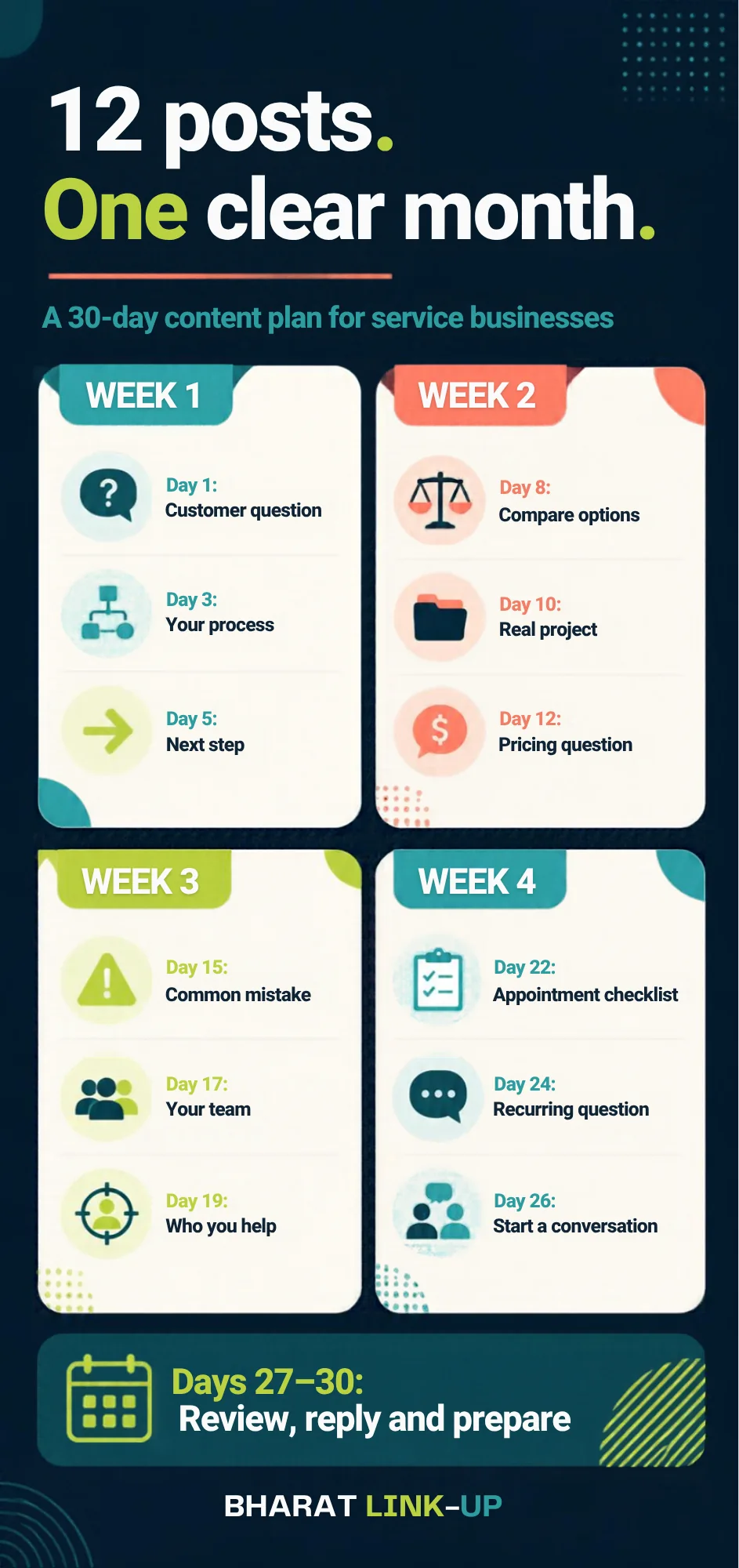
Choose a start date and replace each prompt with a question relevant to your service. Use the days between posts for asset collection, approvals and replies. Days 27–30 are reserved for reviewing the month and preparing the next one.
| Day | Purpose | Format | What to create | Next step |
|---|---|---|---|---|
| 1 | Choose one customer question | Carousel | Explain three things to know before booking | Save this checklist |
| 3 | Show your process | Short video | Film one step of your service with permission | Ask a process question |
| 5 | Explain the next step | Single image | Show what happens after an inquiry | Request a consultation |
| 8 | Help customers compare | Carousel | Compare two suitable options and their tradeoffs | Save the comparison |
| 10 | Show documented work | Photo or carousel | Explain one real project and your contribution | Read the project details |
| 12 | Answer a pricing question | Text post | Explain what affects a quote without inventing prices | Ask for a scoped quote |
| 15 | Prevent a common mistake | Short video | Demonstrate a mistake and a useful correction | Share with someone planning this |
| 17 | Introduce the people | Photo and caption | Show who does the work and their role | Ask us a question |
| 19 | Explain your fit | Carousel | Who the service helps and when another option fits | View service details |
| 22 | Prepare for an appointment | Checklist | What to bring or decide before the first meeting | Save before your appointment |
| 24 | Answer a recurring question | Short video | Give a direct answer with one example | Suggest the next question |
| 26 | Invite a practical conversation | Text or image | Describe one problem you can help solve | Send an inquiry |
The download is free and does not require an email address. Open the CSV in Excel or import it into Google Sheets. Add your platform, owner, exact date and results. These are illustrative briefs—not accounts of completed customer campaigns.
How to use the free template in Google Sheets or Excel
- Download the CSV and open it in Excel, or import it into a blank Google Sheet.
- Choose your start date and convert the numbered days into actual publishing dates.
- Replace the sample briefs with real customer questions. Choose one main platform for each post and assign an owner.
- Review copy, images, permissions and the CTA before changing the status from Draft to Approved.
- Record the published link and review results after the same interval for each post.
This is a twelve-post plan spread across thirty days, not thirty ready-made daily posts. If your team needs daily publishing, add useful questions and documented work rather than repeating the same promotion.
Content ideas for three small service businesses
The same calendar can support different services. Replace a generic promotion with a question a potential customer actually asks. These are illustrative examples, not completed client campaigns or promised results.
| Business | Helpful explanation | Credible process or proof | Relevant invitation |
|---|---|---|---|
| Salon or beauty studio | A preparation checklist for a service you offer | Show a real part of the appointment process, with permission | View that service’s booking details |
| Consultant or small agency | Explain what a first consultation covers | Show an anonymised deliverable or documented method | Read the scope and request a consultation |
| Home-service provider | Explain what information helps prepare an accurate quote | Show a genuine completed job with its context | Check the service area and request a scoped quote |
A sample caption brief for a consultant
Question: What should I send before our first call? Answer: the goal, current situation and decisions you need help with. Evidence: your real preparation process. CTA: read the consultation details before booking. Avoid claiming results you have not measured.
What to do on days without a scheduled post
Use those days to collect assets, check permission, draft and approve the next brief, respond to genuine questions and review published posts. Days 27–30 remain the monthly review and next-month preparation window. A thirty-day calendar does not require thirty feed posts.
3. A worked example: an interior-design consultation
Imagine a small interior-design studio whose prospects ask, “What should I prepare before our first meeting?” This example is fictional; it illustrates the planning method.
- Reader: a homeowner deciding whether to book.
- Question: what information makes the consultation useful?
- Carousel: cover, room measurements, reference photos, budget range, priorities, and a final preparation checklist.
- Evidence: use your actual consultation process and images you own or have permission to share.
- CTA: save the checklist; link to booking details where appropriate.
A separate short video can demonstrate how to take a useful room photo. A later post can explain what happens after the first meeting. Each asset answers a different question instead of repeating the same sales caption.
Write a brief before opening a design tool
Use this six-part brief: audience, question, main answer, evidence, format and CTA. Assign an owner and reviewer. For example: “Create a six-slide preparation checklist using our real booking process. No client photos without permission. The final slide invites readers to save it.”
4. Keep production small enough to repeat
Batch work by activity: outline the week’s three briefs, collect the needed assets, draft the copy, then review the set. Your review should check accuracy, permissions, readable mobile text and whether the next step matches the post.
Leave room for genuine developments such as a new service or a useful customer question. Replace a planned slot rather than adding an obligation you cannot maintain. Do not invent testimonials, scarcity or results to fill a calendar.
AI can help suggest outlines from information you provide. A person still needs to verify every claim, remove confidential details and adapt the draft to the business. For related ideas, explore our AI and creator opportunities, which distinguishes announcements from business experiments.
5. Measure what happened after the post
Record the post URL and review each post after a consistent interval, such as seven days. Use the same interval for comparisons. Track the metric that matches the goal: saves for a reference checklist, relevant site visits for a service explanation, and qualified inquiries for an invitation.
If you track website links, use consistent campaign labels so you can distinguish channels. Record inquiries separately from sales, and avoid attributing all business growth to a single post. A save can be useful without becoming an immediate purchase.
At the end of the month, keep the questions that generated useful responses, revise confusing explanations and retire formats that cost more effort than they justify. A first month is a baseline, not proof of a universal winning formula.
Track the next step, not just the post
For a post linking to your website, record the campaign link, relevant sessions, successful enquiries and the qualified enquiries you confirm manually. Keep these separate: a website visit is not an enquiry, and an enquiry is not a sale.
A simple tagged link can use utm_source=instagram&utm_medium=organic_social&utm_campaign=service_content_calendar. Use consistent labels and compare posts after the same interval. Do not put names, email addresses or other personal details in campaign links.
If Instagram is your main channel, follow our guide to turning Instagram followers into website enquiries. If visitors arrive but do not contact you, use the seven-check website enquiry checklist to examine the next stage of the journey.
Common content-calendar questions
Do I need to post every day?
No. This template starts with 12 posts over 30 days. Choose a pace your team can research, approve and sustain; increase it only when capacity and results justify the change.
Can I use the same idea on Instagram and LinkedIn?
Yes. Adapt the example, format and next step to each audience. A visual preparation checklist and a professional text explanation can share a source without using identical copy.
Does this calendar guarantee leads or viral reach?
No. Outcomes depend on relevance, audience, distribution, service fit and follow-through. The calendar organizes useful experiments; it does not predict revenue.
How do I customize the download?
Import the CSV into your spreadsheet tool, enter dates and owners, replace prompts with real customer questions, and add your approval status and results.
What should a service business include in its content calendar?
Record the date, platform, customer question, format, brief, evidence or asset link, call to action, owner, approval status and result. The download provides the starter columns; add fields that your own approval process requires.
Can I use this social media calendar in Google Sheets?
Yes. In a blank Google Sheet, choose File, Import and upload the CSV. Select an import location and check that the headings and twelve post rows appear in separate columns. You can also open it in Excel; no paid scheduling tool is needed to use the planning file.
Is this a 30-day calendar or 30 ready-written posts?
It is a thirty-day planning cycle containing twelve publishing prompts. You adapt each brief to your real business. The remaining days support preparation, replies and review; the file does not claim to contain thirty finished captions.
Need help turning your plan into posts?
Bharat Link-Up can help with content planning, design and social media support. Share your audience, service and available assets so we can agree a practical scope.
Discuss your content plan ↗ See documented client workEditorial note: this is an original planning framework and illustrative template. It is not a tested claim about platform algorithms. For background on planning, see LinkedIn’s small-business marketing playbook; its historical examples should not be treated as current performance benchmarks.